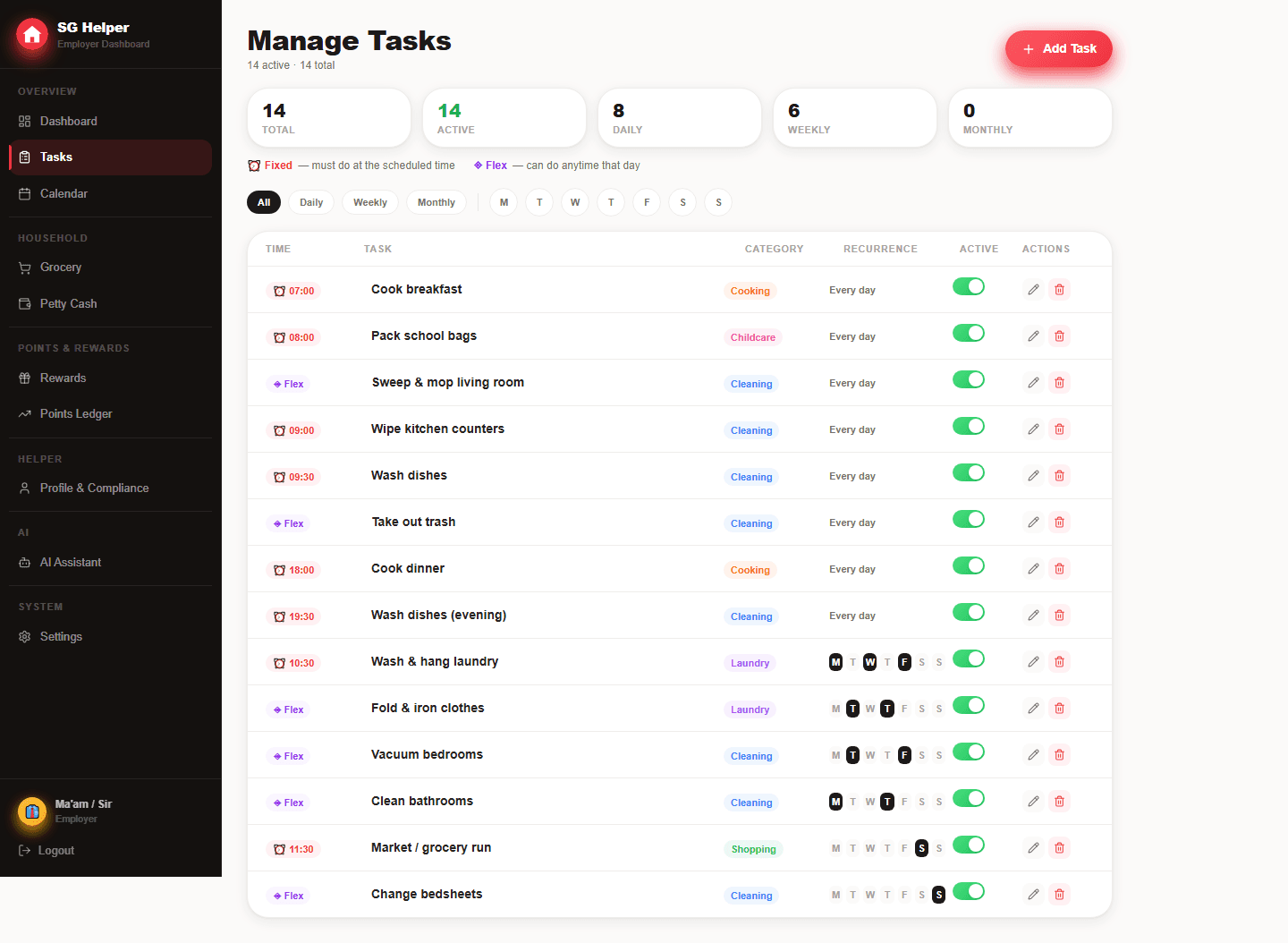
Use anchors, then fill the spaces
A good schedule starts with the parts of the day that cannot move. Everything else should sit in broader blocks so the helper can adapt when the home is busy.
- Morning anchor: breakfast, school prep, laundry start
- Afternoon block: cooking prep, grocery check, ironing or deep-cleaning
- Evening anchor: dinner support, kitchen reset, rubbish and next-day prep
Turn the template into a live routine
Templates are only the starting point. In SG Helper, recurring tasks can appear on the right days while the helper sees one clean mobile list for today.
- Set daily, weekly or monthly recurrence instead of duplicating tasks manually
- Use fixed times for meals, pickups and appointment-related work
- Use the completion view to see when the schedule needs to be lighter or clearer
Example weekday schedule
This template works for many homes with school or office routines. Adjust the sequence around your helper's pace, cooking needs and rest breaks.
- Morning: breakfast, dishes, laundry start, quick floor reset
- Midday: market run, cooking prep, fridge check, ironing if needed
- Afternoon: weekly cleaning rotation or supply restock
- Evening: dinner support, kitchen close-down, rubbish and next-day prep
When to change the schedule
A schedule should change when real life proves it needs to. Use completion patterns and helper feedback before adding more tasks or tighter times.
- If fixed-time tasks are often late, check whether two anchors clash
- If flexible tasks pile up, reduce the daily list or rotate weekly work
- If family plans change often, use calendar notes instead of editing recurrence
- If a task is seasonal, make it monthly or temporary instead of daily
Frequently asked questions
What is a realistic weekday schedule?
Most homes work best with three blocks: morning reset, afternoon prep and evening close-down. Put only true deadlines inside those blocks, then let routine work stay flexible.
How do I handle rest days or unusual family plans?
Use calendar events and one-off notes for changes instead of editing the whole routine. That keeps the normal schedule stable while still making exceptions visible.
Is SG Helper built specifically for Singapore households?
Yes. SG Helper is designed around Singapore domestic-helper workflows, including MOM deadline reminders, work-permit tracking, salary records, petty cash, grocery lists, and multilingual helper access.
Does my helper need to install an app?
No. SG Helper works as a web PWA on mobile and desktop, so employers and helpers can use it from a browser and add it to the home screen when useful.